Monday, January 30, 2017

1.1.e Explain TCP operations - 1.1.e (vi) Global synchronization


TCP global synchronization occurs when a sudden burst of traffic causes simultaneous packet loss across many TCP sessions using a single (congested) link. Each affected TCP session backs off its send rate at the same time, causing link utilization to go way down. When link utilization is down packet loss is low or non-existent and therefore each affected TCP session increases its send rate at the same time, causing link utilization to go way up and causing severe congestion again, and the cycle repeats. The result is a saw tooth shaped bandwidth utilization on the single link causing inefficient use of available bandwidth and inconsistent application throughput.
The leading cause of TCP global synchronization is sudden congestion causing numerous packet drops and simultaneously affecting many TCP flows all at once, as would typically happen in classic tail-drop queue management. More intelligent queue management such as WRED (weighted random early discard) is designed to improve overall network performance by avoiding numerous and sudden packet drops that can cause TCP global synchronization. WRED will randomly drop packets from a queue as it begins to fill, hoping that end stations who’s packets were dropped will offer less load and avoid the more consequential full queue scenario when tail drop begins dropping many packets.
The difference between RED and WRED is that WRED can take into consideration QoS markings in making decisions of which packets to drop, supporting a broader network wide or device specific QoS policy.


https://en.wikipedia.org/wiki/TCP_global_synchronization
TCP global synchronization in computer networks can happen to TCP/IP flows during periods of congestion because each sender will reduce their transmission rate at the same time when packet loss occurs.
Routers on the Internet normally have packet queues, to allow them to hold packets when the network is busy, rather than discarding them.
Because routers have limited resources, the size of these queues is also limited. The simplest technique to limit queue size is known as tail drop. The queue is allowed to fill to its maximum size, and then any new packets are simply discarded, until there is space in the queue again.
This causes problems when used on TCP/IP routers handling multiple TCP streams, especially when bursty traffic is present. While the network is stable, the queue is constantly full, and there are no problems except that the full queue results in high latency. However, the introduction of a sudden burst of traffic may cause large numbers of established, steady streams to lose packets simultaneously.
TCP has automatic recovery from dropped packets, which it interprets as congestion on the network (which is usually correct). The sender reduces its sending rate for a certain amount of time, and then tries to find out if the network is no longer congested by increasing the rate again subject to a ramp-up. This is known as the slow-start algorithm.
Almost all the senders will use the same time delay before increasing their rates. When these delays expire, at the same time, all the senders will send additional packets, the router queue will again overflow, more packets will be dropped, the senders will all back off for a fixed delay... ad infinitum; compare with the thundering herd problem.
This pattern of each sender decreasing and increasing transmission rates at the same time as other senders is referred to as "global synchronization" and leads to inefficient use of bandwidth, due to the large numbers of dropped packets, which must be retransmitted, and because the senders have a reduced sending rate, compared to the stable state, while they are backed-off, following each loss.
This problem has been the subject of much research. The consensus appears to be that the tail drop algorithm is the leading cause of the problem, and other queue size management algorithms such as Random Early Detection (RED) and Weighted RED will reduce the likelihood of global synchronization, as well as keeping queue sizes down in the face of heavy load and bursty traffic.

1.1.e Explain TCP operations - 1.1.e (v) Bandwidth delay product


https://en.wikipedia.org/wiki/Bandwidth-delay_product

In data communicationsbandwidth-delay product refers to the product of a data link's capacity (in bits per second) and its round-trip delay time (in seconds).[1][2] The result, an amount of data measured in bits (or bytes), is equivalent to the maximum amount of data on the network circuit at any given time, i.e., data that has been transmitted but not yet acknowledged.
A network with a large bandwidth-delay product is commonly known as a long fat network (shortened to LFN and often pronounced "elephen"). As defined in RFC 1072, a network is considered an LFN if its bandwidth-delay product is significantly larger than 105 bits (12500 bytes).
Ultra-high speed LANs may fall into this category, where protocol tuning is critical for achieving peak throughput, on account of their extremely high bandwidth, even though their delay is not great.
An important example of a system where the bandwidth-delay product is large is that of GEO satellite connections, where end-to-end delivery time is very high and link throughput may also be high. The high end-to-end delivery time makes life difficult for stop-and-wait protocols and applications that assume rapid end-to-end response.
A high bandwidth-delay product is an important problem case in the design of protocols such as Transmission Control Protocol (TCP) in respect of TCP tuning, because the protocol can only achieve optimum throughput if a sender sends a sufficiently large quantity of data before being required to stop and wait until a confirming message is received from the receiver, acknowledging successful receipt of that data. If the quantity of data sent is insufficient compared with the bandwidth-delay product, then the link is not being kept busy and the protocol is operating below peak efficiency for the link. Protocols that hope to succeed in this respect need carefully designed self-monitoring, self-tuning algorithms.[3] The TCP window scale option may be used to solve this problem caused by insufficient window size, which is limited to 65535 bytes without scaling.


TCP

https://tools.ietf.org/html/rfc1072 Extensions for Long-Delay Paths

1.1.e Explain TCP operations - 1.1.e (iv) Windowing

1.1.e (iv) Windowing

The window size is the amount a unacknowledged data that can be in transit at a given time. This is negotiated between two hosts. While connectivity is reliable, all packets are being received, and upper level protocols are accepting the packets and keeping the buffers empty, hosts will attempt to increase the window size. In the event of missing packets, filling buffers, etc, the hosts will reduce the segment size.

1.1.e [iv] Windowing
Flow control allows us to deal with a situation when a sending computer tries to transmit information at a faster rate than the destination computer can receive and process it. This can happen if the receiving computers have a heavy traffic load in comparison to the sending computer, or if the receiving computer has less processing power than the sending computer.
Sliding-window flow control is best utilized when the buffer size is limited and pre-established. During a typical communication between a sender and a receiver the receiver allocates buffer space for n frames ( n is the buffer size in frames). The sender can send and the receiver can accept n frames without having to wait for an acknowledgement. The receiver acknowledges a frame by sending an acknowledgement that includes the sequence number of the next frame expected. This acknowledgement announces that the receiver is ready to receive n frames , beginning with the number specified. Both the sender and receiver maintain what is called a window. The size of the window is less than or equal to the buffer size.
Sliding window flow control has a far better performance than stop-and-wait flow control. For example in a wireless environment data rates are low and noise level is very high, so waiting for an acknowledgement for every packet that is transferred is not very feasible. Therefore , transferring data as a bulk would yield a better performance in terms of higher throughput.
Adam, Paul (2014-07-12). All-in-One CCIE V5 Written Exam Guide (Kindle Locations 1132-1137).  . Kindle Edition.

http://packetlife.net/blog/2010/aug/4/tcp-windows-and-window-scaling/

Sunday, January 29, 2017

1.1.e Explain TCP operations - 1.1.e (iii) Latency

1.1.e (iii) Latency (RTT)


1.1.e Explain TCP operations - 1.1.e (ii) MSS

https://en.wikipedia.org/wiki/Maximum_segment_size

The maximum segment size (MSS) is a parameter of the options field of the TCP header that specifies the largest amount of data, specified in bytes, that a computer or communications device can receive in a single TCP segment. It does not count the TCP header or the IP header (unlike, for example, the MTU for IP datagrams).[1] The IP datagram containing a TCP segment may be self-contained within a single packet, or it may be reconstructed from several fragmented pieces; either way, the MSS limit applies to the total amount of data contained in the final, reconstructed TCP segment.
To avoid fragmentation in the IP layer, a host must specify the maximum segment size as equal to the largest IP datagram that the host can handle minus the IP header size and TCP header sizes.[2] Therefore, IPv4 hosts are required to be able to handle an MSS of 536 octets (= 576[3] - 20 - 20) and IPv6 hosts are required to be able to handle an MSS of 1220 octets (= 1280[4] - 40 - 20).
Small MSS values will reduce or eliminate IP fragmentation, but will result in higher overhead.[5]
Each direction of data flow can use a different MSS.
For most computer users, the MSS option is established by the operating system.

1.1.e Explain TCP operations - 1.1.e (i) IPv4 and IPv6 PMTU

1.1.e Explain TCP operations
     1.1.e (i) IPv4 and IPv6 PMTU
     1.1.e (ii) MSS
     1.1.e (iii) Latency
     1.1.e (iv) Windowing
     1.1.e (v) Bandwidth delay product
     1.1.e (vi) Global synchronization

https://tools.ietf.org/html/rfc1191
https://en.wikipedia.org/wiki/Path_MTU_Discovery

Path MTU Discovery (PMTUD) is a standardized technique in computer networking for determining the maximum transmission unit (MTU) size on the network path between two Internet Protocol (IP) hosts, usually with the goal of avoiding IP fragmentation. PMTUD was originally intended for routers in Internet Protocol Version 4 (IPv4).[1] However, all modern operating systems use it on endpoints. In IPv6, this function has been explicitly delegated to the end points of a communications session.[2]
PMTUD is standardized for IPv4 in RFC 1191 and for IPv6 in RFC 1981RFC 4821 describes an extension to the techniques that works without support from Internet Control Message Protocol.

1.1.d Explain IP operations - 1.1.d (v) IP MTU

IP MTU

IP Maximum Transmission Unit (MTU)

IPv4 requires that every node must be able to forward an IP packet of 68 bytes without any further fragmentation. This is because an IPv4 header can be as large as 60 bytes in length or have a minimum fragment size of 8 bytes. Every IPv4 node that is the final destination of the IPv4 packet must be able to receive an IPv4 packet of a minimum size of 576 bytes, which can be all or fragments of the original packet.

IPv6 requires that every link have a minimum MTU of 1280 bytes, with a recommended MTU of 1500 bytes, compared to 68 bytes in IPv4. It is recommended that IPv6 devices perform Path Discovery MTU to avoid fragmentation.


1.1.d [v] IP MTU
IPv4 allows fragmentation: dividing the datagram into pieces, each small enough to pass over the single link that is being fragmented for, using the MTU parameter configured for that interface. This fragmentation process takes place at the IP layer (OSI layer 3) and marks packets it fragments as such, so that the IP layer of the destination host knows it should reassemble the packets into the original datagram. This method implies a number of possible drawbacks:
● All fragments of a packet must arrive for the packet to be considered received. If the network drops any fragment, the entire packet is lost.
● When the size of most or all packets exceed the MTU of a particular link that has to carry those packets, almost everything has to be fragmented. In certain cases the overhead this causes can be considered unreasonable or unnecessary.
For example, various tunneling situations cross the MTU by very little as they add just a header’s worth of data. The addition is small, but each packet now has to be sent in two fragments, the second of which carries very little payload. The same amount of payload is being moved, but every intermediate router has to do double the work in terms of header parsing and routing decisions.
● As it is normal to maximize the payload in every fragment, any further fragmentation that turns out to be necessary will increase the overhead even more.
● There is no simple method to discover the MTU of links beyond a node’s direct peers.
● The Internet Protocol requires that hosts must be able to process IP datagrams of at least 576 bytes (for IPv4) or 1,280 bytes (for IPv6). However , this does not preclude Data Link Layers with an MTU smaller than IP’s minimum MTU from conveying IP data. For example, according to IPv6′ s specification, if a particular Data Link Layer physically cannot deliver an IP datagram of 1,280 bytes in a single frame, then the link layer must provide its own fragmentation and reassembly mechanism, separate from IP’s own fragmentation mechanism, to ensure that a 1280-byte IP datagram can be delivered , intact, to the IP layer.

Adam, Paul (2014-07-12). All-in-One CCIE V5 Written Exam Guide (Kindle Locations 1086-1098).  . Kindle Edition.

1.1.d Explain IP operations - 1.1.d (iv) TTL

1.1.d Explain IP operations - 1.1.d (iii) IPv4 and IPv6 fragmentation


IPv4 and IPv6 fragmentation
IPv4 Fragmentation- 

When an IPv4 packet is larger than the network's MTU(default to 1500), and the DF bit within the IP header is clear the packet will be fragmented into smaller pieces so it can be sent to the other end. The maximum size of each piece is the MTU minus the IP header size (20 bytes minimum; 60 bytes maximum).

Fragmentation has a negative impact on router's performance and it should be avoided when possible. 

IPv6 Fragmentation-

As opposed to IPv4, fragmentation in IPv6 is performed by the IPv6 enabled nodes not by the routers along the path. If an intermediate node such as a router receives an IPv6 packet that needs to be fragmented, it will discard the packet and send an ICMPv6 Packet Too Big error message back to the source as routers will not attempt to perform fragmentation unless they are the source of the IPv6 packet.


One of the innovations introduced by IPv6 is the elimination of hop-by-hop packet fragmentation. With the new protocol, fragmentation is managed at the ends by means of a special extension header.

More specifically, there are two main differences: Difference one is the fields for handling fragmentation are not in the basic IPv6 header but are put into an extension header if fragmentation is required. This makes IPv6 fragmentation lean because this fragmentation extension header is only inserted in the packet, if fragmentation needs to be done. Difference two is that IPv6 routers do not fragment anymore. Fragmentation has to be done by the source host. He will evaluate the packet size by using Path MTU discovery.

http://searchnetworking.techtarget.com/answer/What-is-the-difference-between-packet-fragmentation-in-IPv4-and-IPv6
https://blog.apnic.net/2016/01/28/evaluating-ipv4-and-ipv6-packet-frangmentation/

Saturday, January 28, 2017

1.1.d (ii) IPv4 options, IPv6 extension headers

1.1.d Explain IP operations
1.1.d (i) ICMP unreachable, redirect
1.1.d (ii) IPv4 options, IPv6 extension headers
1.1.d (iii) IPv4 and IPv6 fragmentation
1.1.d (iv) TTL
1.1.d (v) IP MTU

IPv4 Options
IPv4 Options

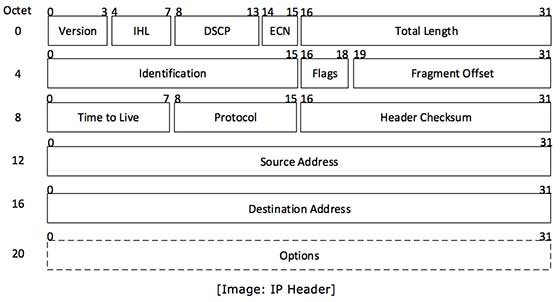
Below a visual description of the Header options found within an IPv4 packet:

IP Header

Here is a description of every option field within the IP header:

Version: Version number of Internet Protocol used. For IPv6 Packet this field will be set to 6. 

IHL: Internet Header Length(4 bits field), this value tells how big the packet is. The minimum value allowed is 5 which would be 20 bytes (no options). The maximum value possible is 15, for a packet header length of 60 bytes (allowing a maximum of 40 bytes for "options").

DSCP: Differentiated Services Code Point, this is where you can apply your QoS tags.

ECN: Explicit Congestion Notification, carries information about the congestion seen in the route.

Total Length: Length of entire IP Packet (including IP header and IP Payload). This field (16 bits) contains the total length of the packet, including the packet header, in bytes. The minimum length is 20 (20 bytes of header plus 0 bytes of data), and the maximum is 65,535 bytes (since only 16 bits are available to specify this). All network links must be able to handle packets of at least 576 bytes, but a more typical packet size is 1508 bytes.

Identification: If IP packet is fragmented during the transmission, all the fragments contain same identification number to identify original IP packet they belong to.

Flags: As required by the network resources, if IP Packet is too large to handle these ‘flags’ tell that if they can be fragmented or not. In this 3-bit flag, the MSB is always set to ‘0’. 

The next three bits are flags related to fragmentation:
The first bit is reserved and must be zero.
 
The second bit is the DF (Don’t Fragment) flag.  If DF is set, the packet cannot be fragmented. 
 
If a packet with DF set reaches a gateway where the ongoing path can’t handle that fragment size without fragementing it, that packet is dropped (and non-delivery notification is returned to the sender).
 
The third bit is the MF (More Fragments) flag. If MF is set, there are more fragments to come. Unfragmented packets have the MF flag set to zero.


Fragment Offset: This offset field (13 bits) tells the exact position of the fragment in the original IP Packet. It is used in reassembly of fragmented packets. It is measured in 8 byte blocks. The first fragment of a set has an offset of 0. Re-assembly involves putting the fragments together in a buffer, with each new fragment located in the reassembly buffer starting at Fragment Offset * 8 bytes from the beginning of the buffer.

Time to Live: (8 bits field)To avoid looping in the network, every packet is sent with a TTL value set, which tells the network how many hops this packet can cross. At each hop, its value is decremented by one and when the value reaches zero, the packet is discarded. The default TTL value is 64, packets with TTL set to 1 within a network segment are meant to be processed by local router.

Protocol: Tells the Network layer at the destination host, to which Protocol this packet belongs to. For example protocol number of ICMP is 1, TCP is 6 and UDP is 17.

Header Checksum: This field is used to keep checksum value of entire header which is then used to check if the packet is received error-free.

Source Address: 32-bit address of the Sender of the packet.

Destination Address: 32-bit address of the Receiver of the packet.

Options: (o - to 40 Bytes field) This is optional field, which is used if the value of IHL is greater than 5. These options may contain values for options such as Security, Record Route, Time Stamp etc.

IPv6 Header and Extensions

IPv6 Header and Extensions

The IPv6 protocol defines a set of headers, including the basic IPv6 header and the IPv6 extension headers.


Header Format
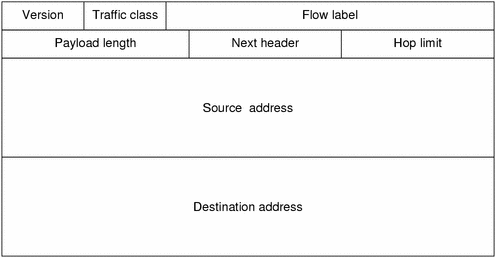
The below image shows the fields that appear in the IPv6 header and the order in which the elements appear.

Diagram shows that the 128 bit IPv6 header consist of eight fields, including the source and destination addresses.

The basic IPv6 header contains 8 fields, in comparison with 12 fields in IPv4, for a total length of 40 octets. Below a list of the IPv6 header options:

Version(4 bit), This field contains the value 6 for IPv6.

Traffic Class(8 bit), Similar to the DSCP field in IPv4, this field is for being tagged with a DSCP value for special handling.

Flow Label(20 bit), This field is used to tag a flow for IPv6 packets. However the current IETF standard does not specify how to manage and process this field.

Payload Length(16 bit), This field represent the payload's length. The payload being the remaining part of the packet following the Ipv6 header.

Next Header(8 bit), Similar to the protocol field in IPv4, it specifies the type of information following the header. The type of information can be an upper layer protocol such as TCP or UDP or it can be one of the new optional extension headers.

Hop limit(8 bit), Similar to the TTL filed in IPv4, this field specifies the maximum number of hops that the IP packet can pass through.

Source Address(128 bit), This field specifies the IPv6 Source address.

Destination Address (128 bits), This field specifies the IPv6 destination address.


IPv6 Extension Headers


IPv6 extension headers are optional headers that may follow the basic IPv6 header. One Ipv6 packet may include 0, 1, 2 or more extension headers. They form a chained list of headers identified by the Next Header field of the previous header.

Below are some IPv6 defined extension headers:

Hop by Hop Options header(protocol 0)- This field is read and processed by every node and router along the path. The hop by hop header option is used for jumbogram packets and the router alert.

Destination Options header(protocol 60)- This header carries optional information that is specifically targeted to a packet's destination address. The mobile IPv6 protocol specification proposes to use the destination options header to exchange registration messages between mobile nodes and home agents.

Routing header(protocol 43)- This header can be used by an IPv6 source node to force a packet to pass through specific routers on the way to is destination.

1.1.d (i) ICMP unreachable, redirect

1.1.d Explain IP operations
     1.1.d (i) ICMP unreachable, redirect
     1.1.d (ii) IPv4 options, IPv6 extension headers
     1.1.d (iii) IPv4 and IPv6 fragmentation
     1.1.d (iv) TTL
     1.1.d (v) IP MTU

https://www.iana.org/assignments/icmp-parameters/icmp-parameters.xhtml
http://www.networksorcery.com/enp/protocol/icmp/msg5.htm
http://dtdccie.blogspot.com/2015/10/11d-i-icmp-unreachable-redirect.html

1.1d (i) ICMP unreachable, redirect

ICMP unreachable

Internet Control Message Protocol (ICMP)is used to communicate to the source host if any errors occured during the routing of packets. 

An ICMP unreachable message is generated and sent back to the sender to inform it that the destination is unreachable.

The IP header plus the first 8 bytes of the original data is sent back to the source host, below some situations where this behavior is seen:

If the gateway has no next hop information to match the destination address on the IP packet or the distance to such network is infinte(i.e. 255) the gateway may send a destination unreachable message to the source host. Also, when fragmentation is needed for the do not fragment flag is set in the packet an ICMP unreachable is going to be sent back to the source host.


Below some ICMP code types:


Type Name     Reference
---- -------------------------  ---------
  0 Echo Reply     [RFC792]
  1 Unassigned        [JBP]
  2 Unassigned        [JBP]
  3 Destination Unreachable    [RFC792]
  4 Source Quench      [RFC792]
  5 Redirect     [RFC792]
 
In this case the ICMP code type 3 is used on the returning packet.
Below an screenshot of a packet capture where the ICMP type code 3 is being used
by the gateway.


ICMP Redirect

ICMP redirect messages are used by the gateway to inform the source host of a better route to the destination is available. For these messages to be sent by the gateway, the below conditions have to be met: 

  • The interface on which the packet comes into the router is the same interface on which the packet gets routed out.
  • The subnet or network of the source IP address is on the same subnet or network of the next-hop IP address of the routed packet.
  • The datagram is not source-routed.
  • The kernel is configured to send redirects. (By default, Cisco routers send ICMP redirects. The interface subcommand no ip redirects can be used to disable ICMP redirects.)  

    Below an important fact to remember when configuring HSRP on a cisco router: 
    ICMP redirects are disabled by default if Hot Standby Router Protocol (HSRP) is configured on the interface. In Cisco IOS Software Release 12.1(3)T and later, ICMP Redirect is allowed to be enabled on interfaces configured with HSRP.

1.1.c Explain general network challenges

1.1.c Explain general network challenges
1.1.c (i) Unicast flooding
1.1.c (ii) Out of order packets
1.1.c (iii) Asymmetric routing
1.1.c (iv) Impact of micro burst


1.1.c (i) Unicast flooding
·        LAN switches use CAM table to forward frames
·        When there is no entry corresponding to the frame's destination MAC address in the incoming VLAN, the (unicast) frame will be sent to all forwarding ports within the respective VLAN, which causes flooding


·        Causes:
o   Asynchronous Routing
o   Spanning-Tree Topology Changes
o   CAM Table Overflow
1.1.c (ii) Out of order packets
·        well-known phenomenon that the order of packets is inverted in the Internet
·        Can be caused by per-packet load-sharing algorithm
·        Can affect network (re-transmissions) and receiver (slow TCP session)


·        Causes Unnecessary Re-transmission: When the TCP receiver gets packets out of order, it sends duplicate ACKs to trigger fast re-transmit algorithm at the sender. These ACKs make the TCP sender infer a packet has been lost and re-transmit it
·        Limits Transmission Speed: When fast re-transmission is triggered by duplicate ACKs, the TCP sender assumes it is an indication of network congestion. It reduces its congestion window (cwnd) to limit the transmission speed, which needs to grow larger from a “slow start” again. If reordering happens frequently, the congestion window is at a small size and can hardly grow larger. As a result, the TCP connection has to transmit packets at a limited speed and can not efficiently utilize the bandwidth.
·        Reduce Receiver’s Efficiency: TCP receiver has to hand in data to the upper layer in order. When reordering happens, TCP has to buffer all the out-of-order packets until getting all packets in order. Meanwhile, the upper layer gets data in burst rather than smoothly, which also reduce the system efficiency as a whole.


Out of order packets

out-of-order delivery is the delivery of data packets in a different order from which they were sent. Out-of-order delivery can be caused by packets following multiple paths through a network, or via parallel processing paths within network equipment that are not designed to ensure that packet ordering is preserved. One of the functions of TCP is to prevent the out-of-order delivery of data, either by reassembling packets into order or forcing retries of out-of-order packets.
IP protocol by nature does not guarantee packet delivery in the order in which they were sent, this is a common behavior since we can’t control the entire path of a packet when traversing different carrier’s networks/Paths.
In principle, applications that use a transport protocol such as TCP or SCTP don't have to worry about packet reordering, because the transport protocol is responsible for reassembling the byte stream  into the original ordering. However, reordering can have a severe performance impact on some implementations of TCP.
Real-time media applications such as audio/video conferencing tools often experience problems when run over networks that reorder packets. This is somewhat remarkable in that all of these applications have jitter buffers to eliminate the effects of delay variation on the real-time media streams.

Notes: Packet reordering can lead to retransmissions, delays, and even connection timeouts.
1.1.c (iii) Asymmetric routing
·        In Asymmetric routing, a packet traverses from a source to a destination in one path and takes a different path when it returns to the source
·        can cause problems with firewalls as they maintain state information.

reference:http://www.cisco.com/web/services/news/ts_newsletter/tech/chalktalk/archives/200903.html

What is Asymmetric Routing?

In Asymmetric routing, a packet traverses from a source to a destination in one path and takes a different path when it returns to the source. This is commonly seen in Layer-3 routed networks.

Asymmetric routing in general is a normal, but unwanted situation in an IP network. Asymmetric routing is a situation where for one reason or another packets flowing in i.e. TCP connections flow through different routes to different directions. As a rough example: Host A and B located in different continents are communicating through a TCP connection. Segments sent from host A to host B reach the destination through WAN LINK X link but segments sent from B to A reach the destination through WAN LINK Y link.

ROUTERA----->WAN LINK X----->ROUTERB  Going  path.
ROUTERB----->WAN LINK Y----->ROUTERA  Return path.

Issues to Consider with Asymmetric Routing

Asymmetric routing is not a problem by itself, but will cause problems when Network Address Translation (NAT) or firewalls are used in the routed path. For example, in firewalls, state information is built when the packets flow from a higher security domain to a lower security domain. The firewall will be an exit point from one security domain to the other. If the return path passes through another firewall, the packet will not be allowed to traverse the firewall from the lower to higher security domain because the firewall in the return path will not have any state information. The state information exists in the first firewall.

Designs Options for Support of Asymmetric Routing in Firewalls

1. Symmetric routing flow through the firewall

Keep the traffic flow symmetric through the firewall infrastructure. Here, the packet flow from one security domain to another will be through a single firewall. Redundancy for the flow is achieved via firewall redundancy (failover configuration).

2. Support of the Asymmetric routing feature

The Asymmetric routing (ASR) feature is supported in both the FWSM 3.x and ASA 7.x code releases, and can be leveraged in the firewalls in active/standby and active/active modes. This feature aligns the firewalls with the Layer-3 network to avoid asymmetric routing issues.

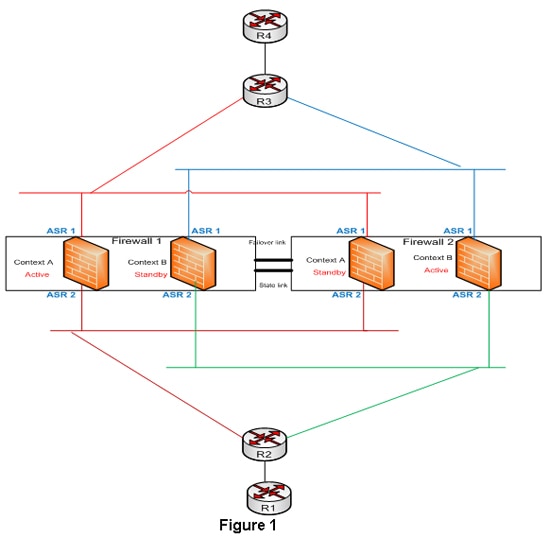
The designs in the data center using firewalls can leverage the asymmetric routing feature and active/active context in multiple context transparent firewalls to have dual routing paths for the same security rules. Figure 1 elaborates this design option:
Figure 1
Firewalls 1 and 2 are in multiple context transparent mode and the security rules are the same for both the contexts. Routers R2 and R1 are in the inside security domain and routers R3 and R4 are in the outside security domain. The outside interfaces of both the firewalls are represented as ASR group 1 and the inside interfaces of the firewalls are represented as ASR group 2. The firewalls will be configured with respective access lists to pass the interesting traffic and the routing protocol information. Keep in mind that the firewall should be in transparent mode for the routing protocol to flow between the inside and the outside security domains and for a neighbor relationship to be formed. Routers R2 and R3 will have separate VLANs connecting each context of the firewall in each security domain. The inside and outside VLANs connecting the firewall will be in the same subnet but in different VLANs, since the firewall is in transparent mode. IGP neighbor relationship will be formed between routers R2 and R3 through these VLANs. This provides two routing paths in the design across two firewall contexts with the same security rule set and the packets can flow through either firewall contexts. The state information synchronization is maintained by ASR feature.

Summary

ASR issues have long been associated with routing designs that involved packets passing through firewalls. The support for asymmetric routing in firewalls changes this previous design philosophy. The asymmetric routing support with other new features can be leveraged for having greater scalability and redundancy for traffic passing through the firewall infrastructure.

This article provides only a snapshot of ASR feature and a design associated with this feature.

1.1.c (iv) Impact of micro burst
·        Micro-bursting - rapid bursts of data packets are sent in quick succession, leading to periods of full line-rate transmission that can overflow packet buffers of the network stack

·        Can be mitigated by a network scheduler


Microbursts are patterns or spikes of traffic that take place in a relatively short time interval(generally sub-second) causing network interfaces to temporarily become oversubscribed and DROP traffic. While bursty traffic is fairly common in networks and in most cases is handled by buffers, in some cases the spike in traffic is more than the buffer and interface can handle. 

 Typical monitoring systems pull interface traffic statistics every one or five minutes by default.  In most cases this gives you a good view into what is going on in your network on the interface level for any traffic patterns that are relatively consistent.  Unfortunately this doesn’t allow you to see bursty traffic that occurs in any short time interval less than the one you are graphing.
The first place you might notice you are experiencing bursty traffic is in the interface statistics on your switch under “Total Output Drops”.
R2#sh int f0/0 | inc Input
 Input queue: 0/75/0/0 (size/max/drops/flushes); Total output drops: 7228


If you are seeing output drops increment, but the overall traffic utilization of that interface is otherwise low, you are most likely experiencing some type of bursty traffic.