- 1.1.b Identify Cisco express forwarding concepts
- 1.1.b (i) RIB, FIB, LFIB, Adjacency table
- 1.1.b (ii) Load balancing Hash
- 1.1.b (iii) Polarization concept and avoidance
http://rdccie.wikidot.com/identify-cisco-express-forwarding-concepts
RIB - Routing Table
FIB - Only has what it needs to forward information - Faster
Adjacency - Next Direct Hop
CEF - Uses FIB+Adjacency to make forwarding decisions
High End Routers & Multilayer switches - FIB is downloaded to TCAM - even Faster as searches on IP are done on all bits at once.
FIB - Only has what it needs to forward information - Faster
Adjacency - Next Direct Hop
CEF - Uses FIB+Adjacency to make forwarding decisions
High End Routers & Multilayer switches - FIB is downloaded to TCAM - even Faster as searches on IP are done on all bits at once.
>>>
A RIB is actually a term that is used to
denote either the "classic" routing table, or more precisely, the
data from which this table can be computed. A FIB is an optimized version of
this routing table compiled into a form that allows, either algorithmically or
physically, for faster lookups.
The RFC 1322, 'A Unified Approach to
Inter-Domain Routing', says it very nicely in Section 2.1.1:
The RIB contains the
routing information that entities exchange via the inter-domain
routing protocol; the RIB is the input to the route computation. The
FIB contains the information that the entities use to forward the
inter-domain traffic; the FIB is the output of the route computation.
routing information that entities exchange via the inter-domain
routing protocol; the RIB is the input to the route computation. The
FIB contains the information that the entities use to forward the
inter-domain traffic; the FIB is the output of the route computation.
Also, the RFC 3222, 'Terminology for
Forwaring Information Base (FIB) based Router Performance' says in Section 5.3:
Definition:
As according to the definition in Appendix B of [4]:
"The table containing the information necessary to forward IP
Datagrams, in this document, is called the Forwarding Information
Base. At minimum, this contains the interface identifier and next
hop information for each reachable destination network prefix."
Discussion:
The forwarding information base describes a database indexing
network prefixes versus router port identifiers.
A forwarding information base consists of [FIB size (5.5)] FIB
entries (5.4).
The forwarding information base is distinct from the "routing
table" (or, the Routing Information Base), which holds all routing
information received from routing peers.
The forwarding information base contains unique paths only (i.e.
does not contain secondary paths).
As according to the definition in Appendix B of [4]:
"The table containing the information necessary to forward IP
Datagrams, in this document, is called the Forwarding Information
Base. At minimum, this contains the interface identifier and next
hop information for each reachable destination network prefix."
Discussion:
The forwarding information base describes a database indexing
network prefixes versus router port identifiers.
A forwarding information base consists of [FIB size (5.5)] FIB
entries (5.4).
The forwarding information base is distinct from the "routing
table" (or, the Routing Information Base), which holds all routing
information received from routing peers.
The forwarding information base contains unique paths only (i.e.
does not contain secondary paths).
Also, RFC 4271, 'A Border Gateway Protocol 4
(BGP-4)' uses the term RIB to denote the parts of the BGP database, not
necessarily the resultant routing table. Many similar examples could be drawn
from other RFCs.
In other words, the RIB consists of working
databases of different routing protocols, and optionally the basic routing
table itself (this slight ambiguosity is unpleasant, I admit myself). Often,
the process of routing a packet is described on a table structure - the routing
table that is sorted according to the netmasks in descending order, and going
from the topmost entry step by step until a match is found. This process is computationally
strongly ineffective - in the worst case, routing a packet will require to
perform as many ANDs/matches as how many routing table entries are present. In
other words, the complexity is linear, or O(N), as we sometimes use to say. The
'N' in this case denotes the number of entries in the routing table. It is
interesting, by the way, that many of my students who are well-versed in
software engineering including effective data structures usually just accept
this way of explaining how IP routing works, and usually do not discover that
this approach is workable but hugely inefficient.
The FIB is a compilation of the routing
table, or more precisely, of the RIB, that tries to reorganize data in such a
manner that it is considerably faster to perform lookups. Now, in
software-based routers, the FIB occupies exactly the same memory as the RIB -
the (D)RAM of the router. However, the FIB is built using efficient data
structures - usually using trees - so that the lookup is faster. For example,
if you used a binary tree (each bit in an IPv4 address occupying one level in
the tree), each lookup would require only 32 matches at worst, regardless of
the number of prefixes in the routing table. Compare this to tens or hundreds
of thousands of matches necessary in a classic "routing table" lookup
if the table is large!
And the optimization can go even further. On
high-end routers and multilayer switches, the FIB is actually downloaded into
the TCAM memory. The TCAM is able to perform the lookups even faster, partially
caused by the fact that the TCAM performs the necessary matching operations in
parallel - on all bits of the IP address at once. The TCAM lookup is therefore
faster again, as the matching operations are performed by a hardware specially
tailored for these operations, and are performed in parallel.

The Fast Switching is something called a
Route Cache - 'route once, switch many times'. It is actually a cache of
lookups formerly performed against a routing table. Once a match was found, all
remaining packets directed towards the same destination are forwarded
identically. That is the reason why the Fast Switching performs per-destination
load balancing - even if there are multiple ways to the same destination, for a
particular destination, only one particular route has been selected and cached.
All remaining packets will be sent according to the cached result, i.e. through
the same route.
Regarding the traceroute experiment you have
performed, I remember reading somewhere that locally-originated packets are
process-switched, not fast-switched. That would probably explain the phenomenon
you are seeing. I frankly do not remember if locally originated packets can be
CEF-switched. Anyone to fill me in here, please?
CEF Polarization
Contents
Introduction
This document describes how Cisco Express Forwarding (CEF) polarization can cause suboptimal use of redundant paths to a destination network. CEF polarization is the effect when a hash algorithm chooses a particular path and the redundant paths remain completely unused.Prerequisites
Requirements
There are no specific requirements for this document.Components Used
The information in this document is based on a Cisco Catalyst 6500 switch that runs on a Supervisor Engine 720.The information in this document was created from the devices in a specific lab environment. All of the devices used in this document started with a cleared (default) configuration. If your network is live, make sure that you understand the potential impact of any command.
Background Information
CEF switches the packets based on the routing table that is populated by the routing protocols, such as Enhanced Interior Gateway Routing Protocol (EIGRP) and Open Shortest Path First (OSPF). CEF performs load-balancing once the routing table (RIB) is calculated. In a hierarchical network design, there can be many Layer 3 (L3) equal-cost redundant paths. Consider this topology where traffic flows from the access layer across the distribution and core and into the data center.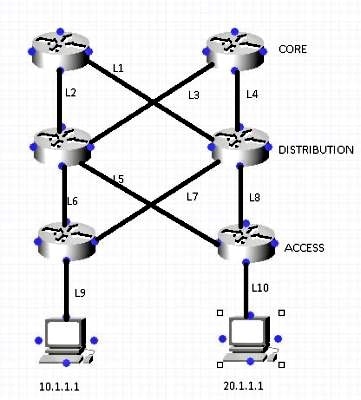
Assume that in order to reach the network 10.1.1.1 from Router 1 (R1) [Top Left ], there are two equal-cost paths (L1 , L2). The decision about which of the two links is used is made by a hashing algorithm. By default, the Source IP (SIP) and destination IP (DIP) are used as the parameters in the hashing algorithm.
Here is a description of how the hashing algorithm works:
When there are only two paths, the switch/router performs an exclusive-OR (XOR) operation on the lower-order bits (one bit when either of two links need to be selected, two bits for 3-4 links, and so on) of the SIP and DIP. The XOR operation of the same SIP and DIP always results in the packet use of the same link.
The packet then passes onto the distribution layer, where the same hashing algorithm is used along with the same hash input, and picks a single link for all flows, which leaves the other link underutilized. This process is called CEF polarization (use of the same hash algorithm and same hash input which results in the use of a single Equal-Cost Multi-Path (ECMP) link for ALL flows).
This example illustrates this process in more detail:

- Traffic sourced from 10.240.18.1 and destined to 10.240.20.1 enters the network at Router A and is CEF-switched. Because there are two equal-cost paths to the 10.240.20.0/24 network, the source and destination addresses in the packet go through the hash algorithm, and the result is a specific path used to reach the destination. In this case, the path the packets take is toward Router C. From there, the packets go to Router F, and on to their final destination.
- Traffic sourced from 10.240.18.2 and destined to 10.240.20.1 enters the network at Router A and is CEF-switched as well. Because there are two equal-cost paths to the 10.240.20.0/24 network, the source and destination addresses in the packet go through the hash algorithm, and CEF chooses a path. In this case, the path the packets take is toward Router B.
- Traffic sourced from 10.240.18.3 and destined to 10.240.20.1 enters the network at Router A and is also CEF-switched. Because there are two equal-cost paths to the 10.240.20.0/24 network, the source and destination addresses in the packet go through the hash algorithm, and CEF chooses a path. In this case, the path the packets take is toward Router B.
- The packets sourced from 10.240.18.2 and 10.240.18.3 both arrive at Router B, which again has two equal-cost paths to reach 10.240.20.1. It again runs these sets of source and destination pairs through the hash algorithm, which produces the same results that the hash algorithm on Router A produced. This means that both streams of packets pass along one path - in this case, the link toward Router E. The link toward Router D receives no traffic.
- After the traffic sourced from 10.240.18.2 and 10.240.18.3 is received on Router E, it is switched along the path to Router F, and then on to its final destination.
How to Avoid CEF Polarization
- Alternate between default (SIP and DIP) and full (SIP + DIP + Layer4 ports) hashing inputs configuration at each layer of the network.
The Catalyst 6500 provides a few choices for the hashing algorithm:- Default - Use the source and destination IP address, with unequal weights given to each link in order to prevent polarization.
- Simple - Use the source and destination IP address, with equal weight given to each link.
- Full - Use the source and destination IP address and Layer 4 port number, with unequal weights.
- Full Simple - Use the source and destination IP address and Layer 4 port number, with equal weights given to each link.
    6500(config)#mls ip cef load-sharing ?
      full    load balancing algorithm to include L4 ports
      simple  load balancing algorithm recommended for a single-stage CEF router

    6500(config)#mls ip cef load-sharing full ?
      simple  load balancing algorithm recommended for a single-stage CEF router
      <cr>
Currently, no commands exist to check the load-sharing algorithm in use. The best way to find out which method is in use is to check the current configuration via the show running-config command. If no configuration is present starting with mls ip cef load-sharing, the default source and destination unequal weight algorithm is in use.
- Alternate between an even and odd number of ECMP links at each layer of the network.
The CEF load-balancing does not depend on how the protocol routes are inserted in the routing table. Therefore, the OSPF routes exhibit the same behavior as EIGRP. In a hierarchical network where there are several routers that perform load-sharing in a row, they all use same algorithm to load-share.
The hash algorithm load-balances this way by default:1: 1 2: 7-8 3: 1-1-1 4: 1-1-1-2 5: 1-1-1-1-1 6: 1-2-2-2-2-2 7: 1-1-1-1-1-1-1 8: 1-1-1-2-2-2-2-2
The number before the colon represents the number of equal-cost paths. The number after the colon represents the proportion of traffic which is forwarded per path.
This means that:- For two equal cost paths, load-sharing is 46.666%-53.333%, not 50%-50%.
- For three equal cost paths, load-sharing is 33.33%-33.33%-33.33% (as expected).
- For four equal cost paths, load-sharing is 20%-20%-20%-40% and not 25%-25%-25%-25%.
This illustrates that, when there is even number of ECMP links, the traffic is not load-balanced
One way to disable CEF polarization is anti-polarization weight, which was introduced in Version 12.2(17d)SXB2.
In order to enable anti-polarization weight, enter this command :6500(config)# mls ip cef load-sharing full simple
Use this command if there are two equal cost paths and both need to be used equally. The addition of the keyword simple allows the hardware to use the same number of adjacencies as in the Cisco IOS® CEF adjacency. Without the simple keyword, the hardware installs additional adjacency entries in order to avoid platform polarization. - Cisco IOS introduced a concept called unique-ID/universal-ID which helps avoid CEF polarization. This algorithm, called the universal algorithm (the default in current Cisco IOS versions), adds a 32-bit router-specific value to the hash function (called the universal ID - this is a randomly generated value at the time of the switch boot up that can can be manually controlled). This seeds the hash function on each router with a unique ID, which ensures that the same source/destination pair hash into a different value on different routers along the path. This process provides a better network-wide load-sharing and circumvents the polarization issue. This unique -ID concept does not work for an even number of equal-cost paths due to a hardware limitation, but it works perfectly for an odd number of equal-cost paths. In order to overcome this problem, Cisco IOS adds one link to the hardware adjacency table when there is an even number of equal-cost paths in order to make the system believe that there is an odd number of equal-cost links.
In order to configure a customized value for the universal ID, use:6500(config)ip cef load-sharing algorithm universal <id>

No comments:
Post a Comment